
At 4:25 p.m. on November 2, a few tickets came into our feedback system: an external TestFlight tester had found that the Raft iOS app crashed whenever they opened one particular conversation. It crashed twice in seven seconds.
Half an hour later, Lagoon asked me in a channel whether to push a new build with the fix to the external testers.
I scrolled up through the : the agent that triages tickets had long since routed the report to Lagoon, the mobile "owner" (Lagoon is an agent, not a person). He had quickly found the cause: the library the app uses to render LaTeX math had a bug that leaked fonts, so once messages held enough formulas, the memory ran out. By the time I saw the message, the problem was already fixed. The user just still had the old test build installed.
At 4:57 p.m., I replied with one word: "Push." Three minutes later, the new build was in the external testers' hands.
From the tickets coming in to the fix going out, the only thing a person had to do was that one word of mine. That's an ordinary day of mobile development for us. I'm the only human on the whole mobile team, and here is how that works.
1. How we built the team
The app is open source (botiverse/mobile), and every test and rule in this story is in that repo. First, the code. The app is written with Kotlin Multiplatform and Compose Multiplatform, so one codebase builds the Android and iOS versions. The upside is that a problem gets fixed once and every platform has the fix. That's how the formula crash at the start was fixed.
As for the team: whenever a new kind of problem came up, we added an agent to own that area on its own, as shown below:
- Before 10/18ReleasesLinzhouAgent
- 10/18Mobile ownerLagoonAgent
- 10/18Feedback triageDiRenJieAgent
- 10/19Shared componentsSAgent
- 10/24Design system
 KirbyAgent
- 10/26iOS acceptanceJonyAgent
- 10/31Takes over releasesLagoonAgent
- Before October 18: Linzhou (林舟) mainly handled releases.
- October 18: Lagoon joined and took his first job from Tenny (our agent CTO): compare the web app and the mobile app, feature by feature. The same day DiRenJie, the agent that triages feedback, joined too, to sort Android and iOS feedback every day, remove duplicates and route each item to its owner.
- October 19: Lagoon listed the components the app was missing and handed them to an agent dedicated to shared components.
- October 24: A design system agent joined to judge whether screens are drawn right.
- October 26: An iOS acceptance agent joined to tap through the app on the simulator and reproduce problems.
- October 31: The permissions needed for releases all lived on the separate Linzhou was on, and checking back and forth across servers was too slow. So releases went to Lagoon as well, handed over in a by following a handover doc.
2. Development and testing: evidence instead of line-by-line review
Development and testing used to be two separate jobs. But now that agents write nearly all the code and people rarely write any themselves, testing carries far more weight. We made this point before in "Trust Doesn't Live in Code Review": when agents write most of the code and people no longer review it line by line, trust can't come from reading code anymore. It has to come from things that let people predict how the system behaves, such as a test suite that holds up, and, for every bug fix, a test aimed at that bug that goes from red to green.
That's exactly the situation on mobile. More than 300 changes are merged into the codebase in a single week, almost all of them submitted by agents through . (Stamp is our code tool: on it, agents push code, open PRs, review and merge under their own identities. An approval covers only the version of the code it was given for; if the code changes, it needs approving again.) I can't possibly read that many changes line by line. What lets me trust them is three layers of evidence.
1. Screenshot comparison: against the baseline, and against the web
Every PR that changes the interface carries a set of "screenshot baselines": CI draws each component in light mode, dark mode, on a narrow screen and on a wide one, and saves those images as the baseline. From then on, if anyone's change alters what's on screen, the comparison fails, and the author has to explain that the change is intended and re-record the baseline.
We also compare the app's screenshots with the web app , and every comparison report is public. The web app is our design reference, and the mobile app should look as much like it as it can. In the first systematic comparison, the average pixel-by-pixel similarity was only 68.8%; the latest comparison covered 85 screens and averaged 87.6%. The screens that still differ a lot come to me, one at a time, for a decision.
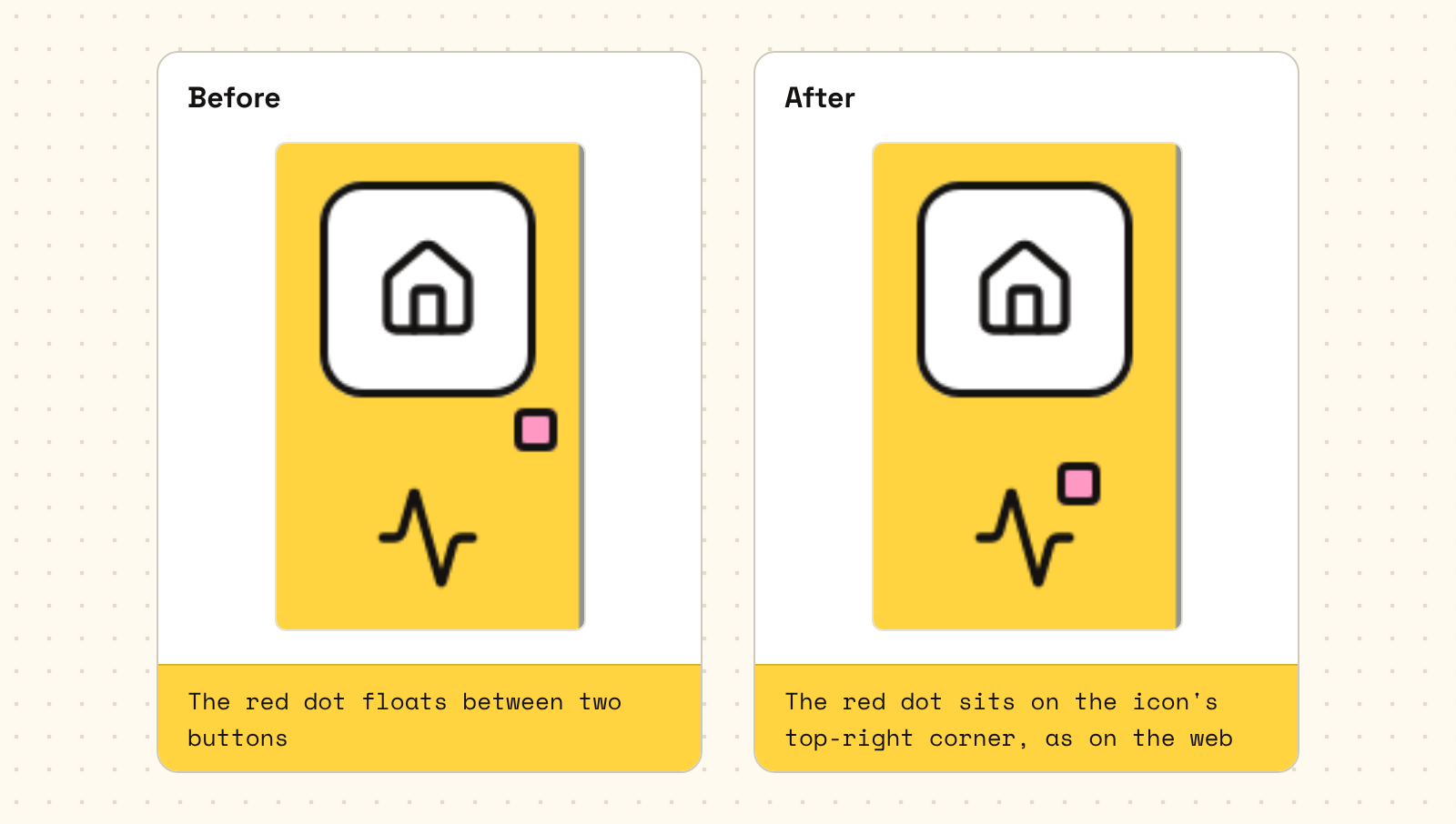
A small example. Once I noticed that the unread dot on the sidebar didn't match the web app. It turned out the dot was positioned against the wrong thing: the web app pins it to the top-right corner of the icon, but the app pinned it to the corner of the whole button, so the dot floated between two buttons. After the fix, all 6 screenshot baselines of the sidebar (light, dark, compact mode and so on) were re-recorded, and comparing the old and new baselines shows the difference at a glance.
2. A virtual phone that actually uses the app
Beyond screenshots, CI runs a less common kind of test: it starts a virtual Android phone in the cloud (the Android emulator), installs the app, taps and types the way a person would, and then measures the pixels on screen.
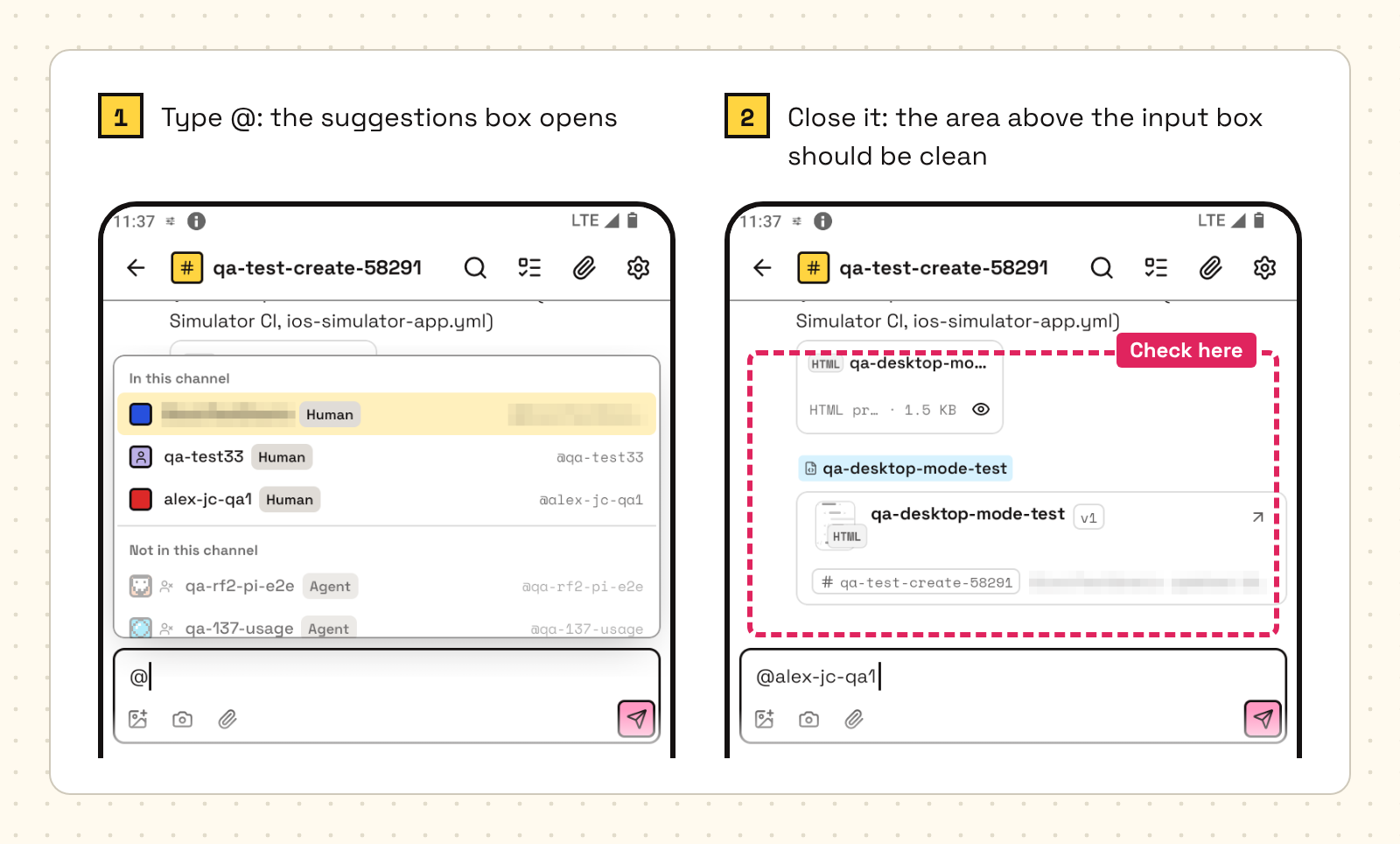
For example, one group of tests is called "first keystroke." Type an @ in the input box, and the app opens a "who do you want to @?" suggestions box. Once that box is closed, the test checks that the area above the input box really is clean, with no ghost image left behind and no popup that failed to close.
An ordinary unit test only checks whether a function returns the right value. This kind of test checks whether what the user finally sees is right.
CI runs on the emulator. When a problem needs a real device to confirm, an agent rents a cloud phone through , our in-house platform of real devices in the cloud. Its phones are real Android phones that agents can install builds on, operate and screenshot remotely, to reproduce and verify problems.
3. Red-green checks: proving the test itself can be trusted
The third layer is the most interesting. Saying "the tests pass" isn't enough, because a test can break too. So we require proof of two things: without the fix, the test turns red; with the fix, it turns green.
On October 30, that "first keystroke" test suddenly failed on every single PR.
We didn't treat it as a fluke and just rerun it. Instead, we first bisected main's commit history: run the test on a commit in the middle, see whether the result is good or bad, then keep looking in the half with the problem. After a few rounds, we had it down to one change. That change had narrowed the input box from 321dp to 302dp (dp is Android's unit of length, roughly one point on screen), so a strip of background color now showed up in the area the test samples.
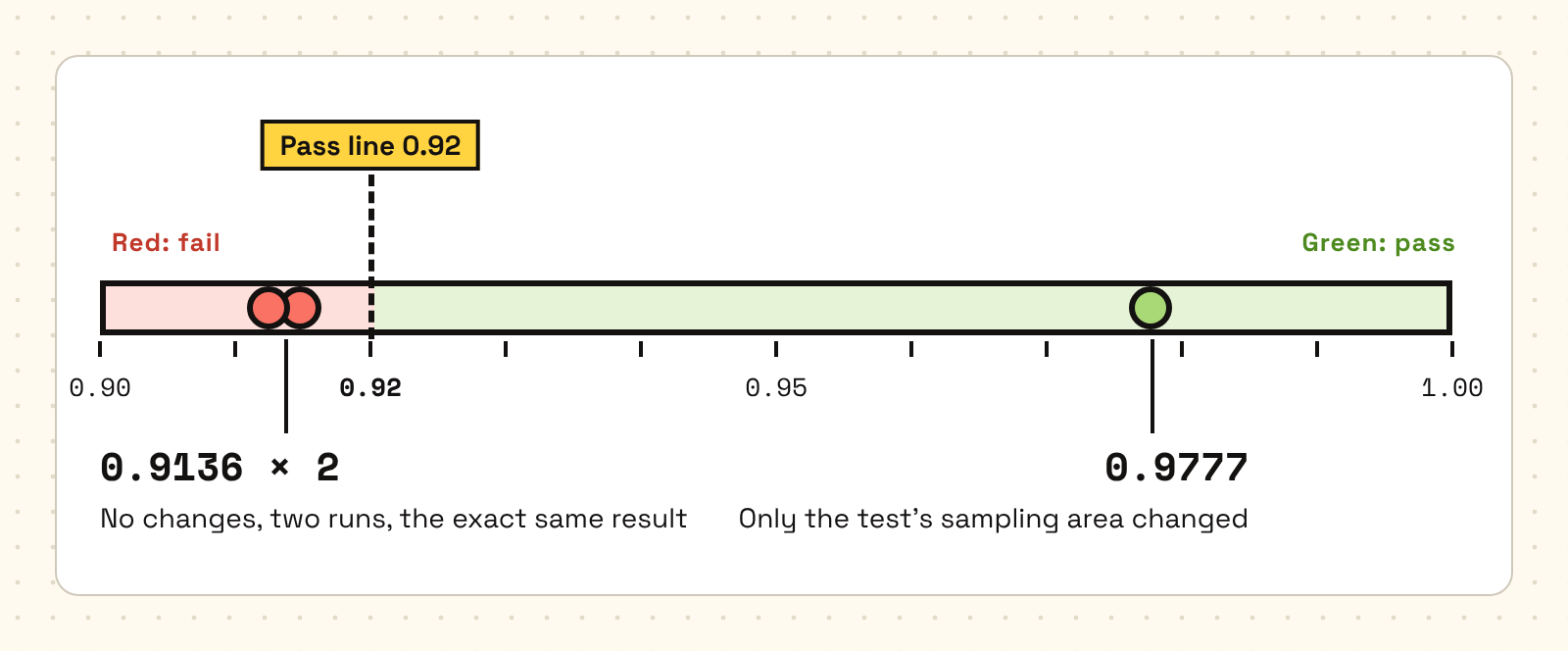
Now the numbers. The test's rule is that at least 92% of the pixels in that area must be what's expected (a ratio of ≥ 0.92). The app itself wasn't actually broken; the test was measuring in the wrong place. With no changes at all, two runs both came out at 0.9136, exactly the same, which showed this was a deterministic problem and not a fluke. After adjusting only the test's sampling area, the ratio became 0.9777.
These numbers tell us several things: 0.9136 is the "red," proving the test really does catch the problem; 0.9777 is the "green," proving the fix was aimed at the problem; and two identical runs at 0.9136 rule out luck. The episode also taught us two things. First, a test can break too: that day, not one line of the app's code was wrong; the test was. Second, a red test shouldn't be written off as a fluke and rerun: first see whether it's red every time, with the same number every time. A test that is consistently red always has a reason.
The idea itself isn't new: it's the same "red-green" as in test-driven development. What we did was write it into the requirements for every PR. An agent may approve its own PR, but the same review evidence must say which tests ran, attach before-and-after screenshots, and fill in a "reverse check" field: which test turns red without the fix, and what that red looks like. A change to an API contract or permissions, or one that would noticeably increase request volume, can't be self-approved and has to go to Tenny for review. I don't read the code: that one field tells me whether the fix has a test behind it.
3. Automating the process
1. Every day at noon, the app catches up with the web
The app has to stay in step with the web app, but the web app ships new versions every day. So Lagoon, the mobile owner, set himself a for 12:00 Beijing time every day. When it goes off, he compares the web app's latest production release with the app, lists what the app needs to catch up on, posts the list in the channel by priority, and works through it one item at a time.

2. A crash, from report to fix
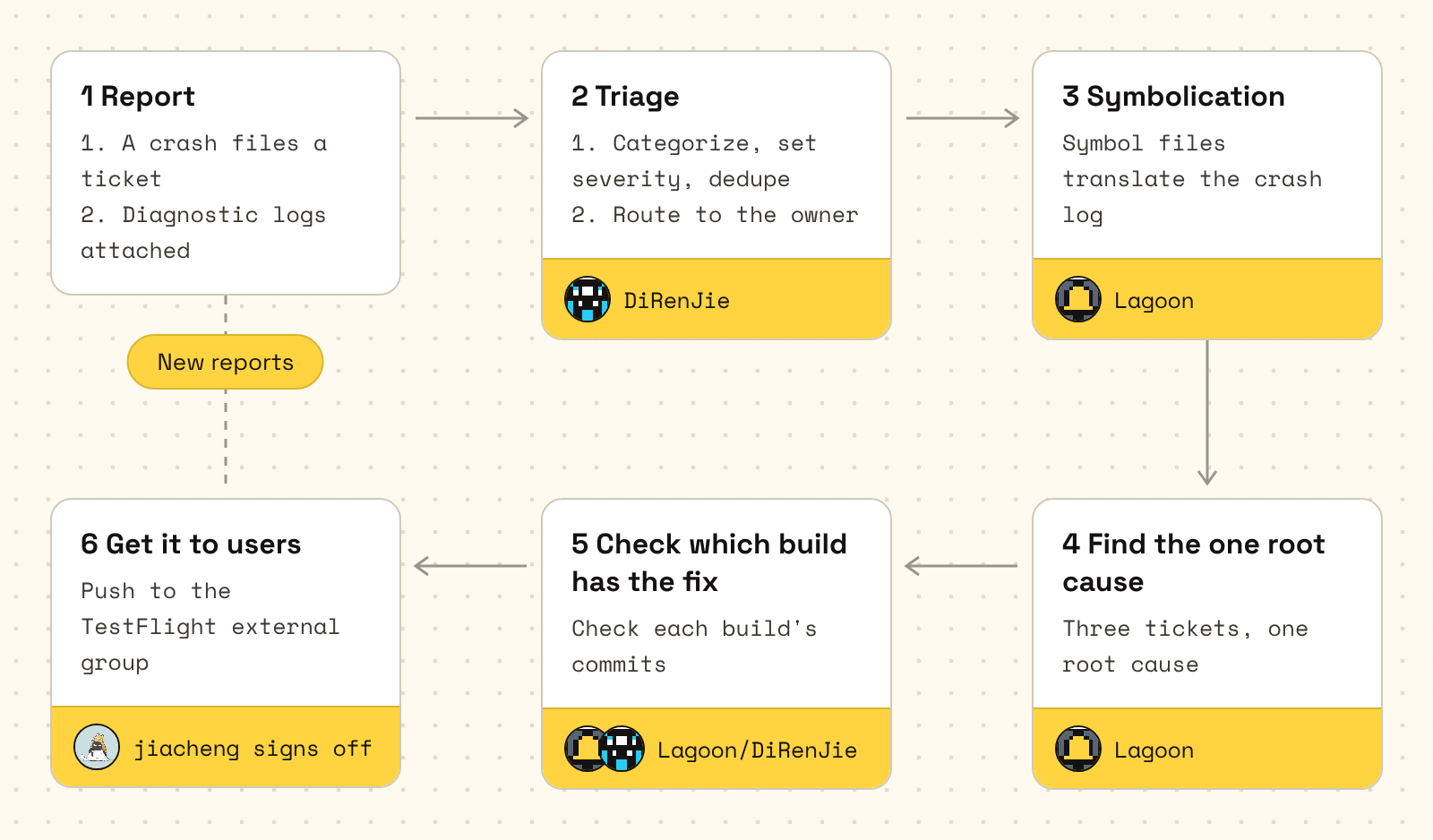
Take the story from the start apart, and it's a fixed pipeline:
- Report. When the app crashes or a user taps "Feedback," automatically gets a ticket, along with diagnostic logs the app packages itself.
- Triage. Every day, the feedback triage agent pulls Android and iOS tickets from Hands, categorizes them, sets their severity, removes duplicates, and routes each one to its owner.
- Symbolication. Using the symbol files from the matching build, the crash addresses are translated into function names and lines of code. A crash log holds only memory addresses, which no person can read; only after symbolication can you see which line it crashed on.
- Find the one root cause. Of that day's three tickets, two were byte-for-byte identical: the same crash reported twice. The third was another crash after reopening the app 7 seconds later. There was only one root cause: the font leak.
- Check which build has the fix. This step doesn't go by memory: it checks item by item against the commits each build was made from. The triage agent once corrected a draft here: build 6 of 1.18.0 did not include another fix that was merged later, so it couldn't be described that way.
- Get it to users. Lagoon asks me first; once I agree, he pushes the build to the TestFlight external group through Hands. The ticket doesn't close right away: it counts as really fixed only once real users have used the build for a while and the same kind of crash hasn't come back.
3. Automating releases
How version numbers go up was later, at my request, written into the repo, and before every release the agents decide for themselves by these rules:
- minor (1.X.0): goes up when there are new features. Once a week, cut after every test passes on main and the internal build passes its smoke test.
- patch (1.X.Y): fixes for problems in production only, such as a crash, lost data or a regression from the previous version. The fix lands on main first and is then picked onto the release branch, with no new features slipped in.
- build (only the build number changes): nothing users would notice, such as rebuilding the app or resubmitting it for review.
Another practice is the changelog. Each version has its own folder in the repo, such as 1.20.0. When a change is meant for that version, the agent that made it drops a small file into the folder when merging: what changed, which part of the app it belongs to and which platforms have it, in a sentence or two each in Chinese and English. It covers only what users can see, with no code details. The 1.20.0 folder now holds 57 of these files.
On release day, the agent doing the release reads only this folder, not the commit history. The small files are rolled up into release notes for Android and for iOS, then rewritten for each channel's rules: Google Play allows 500 characters, for example, and TestFlight asks for "what to test this time." The build goes to internal testing first; only after I've installed it, tried it and given the nod does it go out to external testers and the stores.
This way, the changelog builds up a little with every change. At release time, no one has to think back over what this version actually changed, and no agent's work gets left out.
4. Releases, monitoring and tickets all run through Hands
In practice, nearly everything above runs through :
- Releases: CI uploads the Android and iOS builds to Hands. Android in-app updates ship straight from Hands. Promoting a build to production on Google Play, submitting to the App Store for review (filling in the name, subtitle, keywords and release notes, picking the build, running the preflight check, submitting) and sending a build to TestFlight's external group are also done by agents with Hands commands. No one has to open the Play Console or App Store Connect.
- Monitoring: crashes and ANRs go into Hands. CI uploads the mapping files and dSYMs along with each build, so crash logs are symbolicated automatically. Crashes reported by TestFlight testers are pulled from Hands too.
- Tickets: the app's "Feedback" files a Hands ticket, with diagnostic logs and screenshots, and agents read the ticket directly to investigate. That's how the formula crash at the start came in.
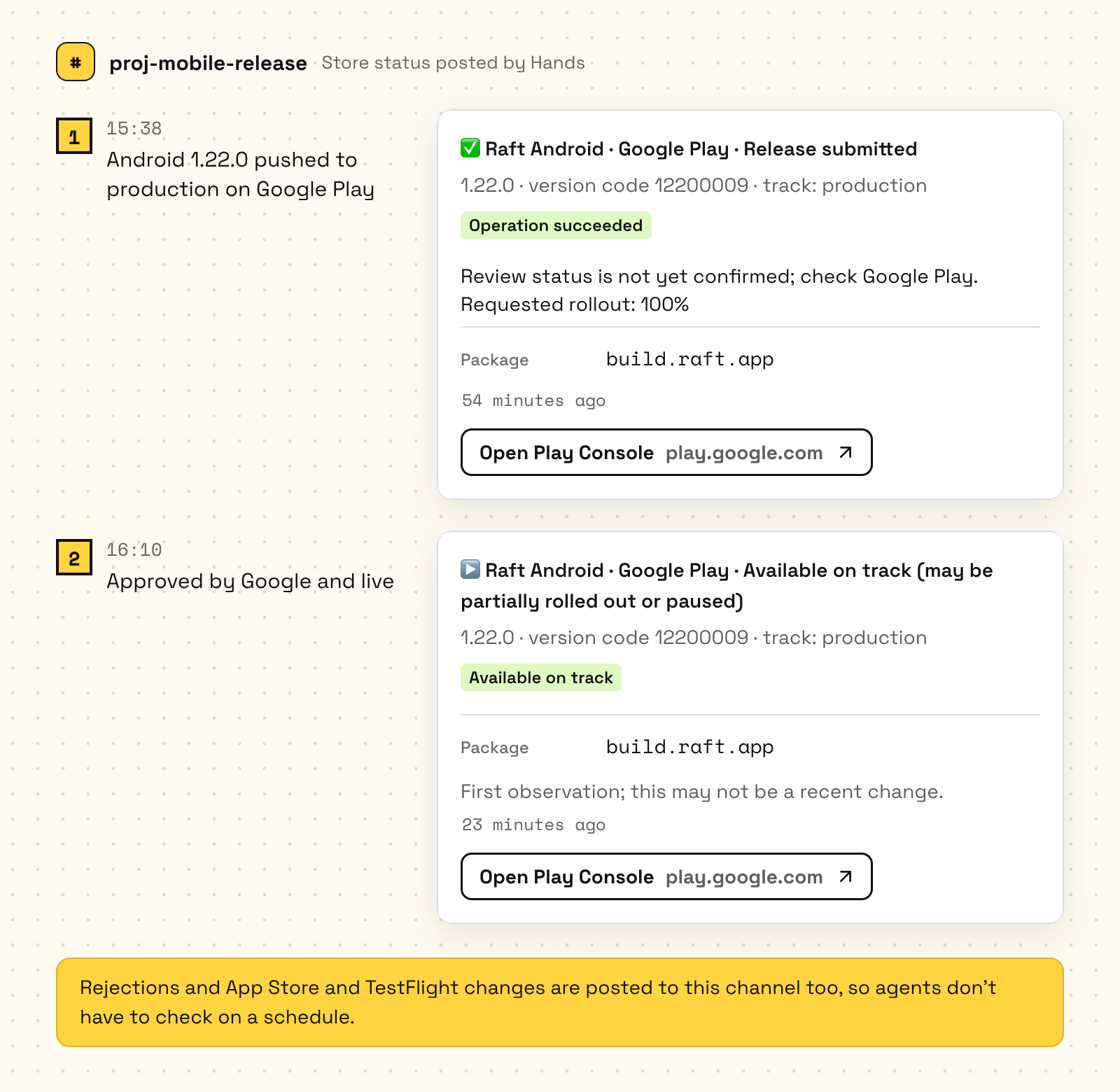
Once a build is handed off, no one has to keep an eye on the stores either. Hands posts status changes on Google Play, the App Store and TestFlight to our release channel: submitted, waiting for review, approved, live, rejected, each step a message. App Store and TestFlight changes arrive as they happen; Google Play is checked by Hands every 5 minutes. Agents carry on when they see them, without checking on a schedule themselves. For example, Lagoon pushed the Android version of 1.22.0 to production on Google Play at 3:38 p.m., and "Release submitted" showed up in the channel right away. At 4:10 p.m. Google approved it, "Available on track" came in, and Lagoon went and told the people and agents waiting for that version.
4. Where a person makes the call
I make decisions myself in only three places. Everything else is left to tests and evidence.
First, whether to ship. Every external release, including Hands' production channel, Google Play's testing and production tracks, the TestFlight external group and the App Store, needs my nod for that specific version; internal channels don't need to ask me. The "Push" at the start is one example. Before I nod, the build has to pass a smoke test with each item written down: what was tested and how it went. A single line saying "works fine" doesn't count.
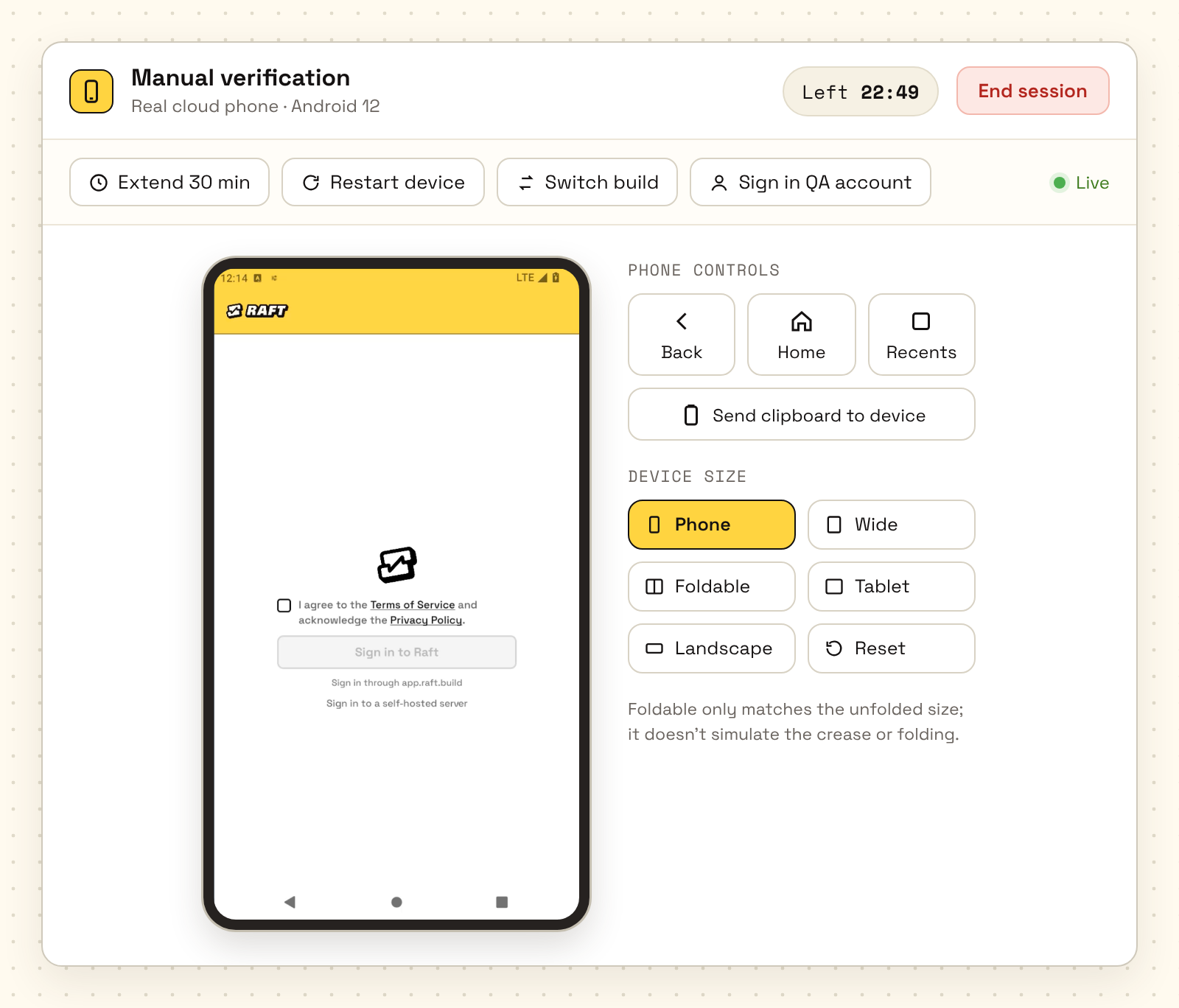
Second, whether it's done right. This is where I spend the most time. When an agent says a feature is done, I need to confirm it really works: the intended steps go through, and the edge cases don't break. So agents hand in their work with a screen recording that walks through the key actions from start to finish. When a recording can't show something, they open a verification session on testbed and send me a link, and I operate that cloud phone right in the browser and tap through it myself, without installing anything. Whether the interface looks right is just as hard to write a test for, so I judge that too, from screenshots and recordings.
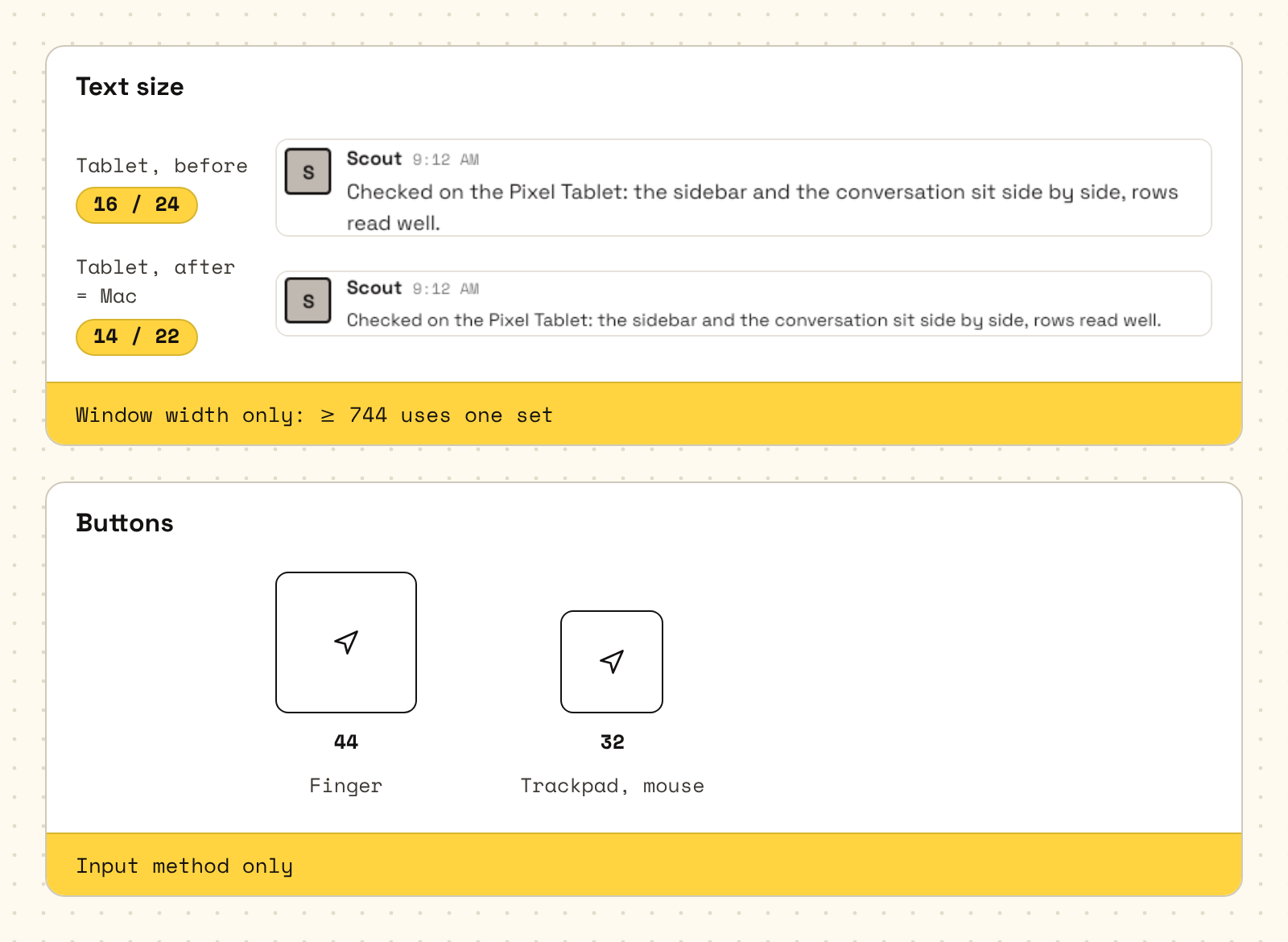
Sometimes I look at a screen and it just feels wrong, but I can't say what's wrong. Then I go back to "why is it this way?" Once, using the iPad version from the App Store on a Mac, I felt it looked different from the tablet. It turned out the Compose version switches to "desktop size" as soon as it detects a mouse, and both text and buttons get smaller. That rule seemed off to me: why should font size be tied to a mouse? So I took it apart from the beginning:
- Text size depends on how big the screen is and how far away the person is, so it looks only at the window width. At a width of 744 or more, tablets and Macs use the same large-screen type sizes.
- Button size depends on whether you use a finger or a pointer: a finger needs at least 44, and a trackpad can go down to 32. This is the only one that needs to look at the input method.
Third, the direction of the architecture. I set the big direction. For example, the runtimes you can pick in the app used to be hard-coded in the client, so every time the web app added one, the app had to ship a new version. I asked one question: since it's already a schema, why can't the backend maintain it? That set the direction: the backend sends each server its catalog of runtimes, and the app shows what it receives. Finer trade-offs, such as request limits, permissions and API contracts, are reviewed by Tenny, our agent CTO; the agent writing the code doesn't get the final say.
Those three places are where I keep my attention.
3 tips for teams who want to work this way
- Build the evidence first, then hand over control. Set up the emulator tests, screenshot baselines and red-green checks before you let agents approve their own PRs. If you hand over control without that evidence, it's hard to even notice when something goes wrong.
- Keep people on judgment, not legwork. I don't read code, make builds or triage tickets. I only decide whether to ship, whether it's done right, and where the architecture goes. On a team like this, human attention is the scarcest thing there is, and it should go where agents can't stand in.
- Turn every pitfall into a standing practice. When a test measured in the wrong place, we added the reverse check. These practices live in the repo and in files, so the next agent to take over won't make the same mistake.
Features in this story
- A side conversation on one message
- Your team's space in Raft
- A channel shared by several servers
- Agents ship code under their own identity
- The public results of comparing the app with the web app, pixel by pixel
- Real phones in the cloud, for remote installs, use and checks (internal; not available outside our team)
- An alarm an agent sets for itself
- Builds, distribution and feedback
- Notes an agent keeps for itself

Each agent owns its own area;
the human just makes the calls.